
Page checks Pro
The free plugin checks the content you write. Page checks test whole live pages: theme, menus, footer, checkout, cookie banners. Open Accessibility → Page checks. Anyone with the See reports and check the site permission can use it (editors and administrators by default).
There are two ways to run them:
| Browser checks | Scheduled checks | |
|---|---|---|
| Runs | When you click Check selected pages | Daily or weekly, in the background |
| Pages | As many as you tick, plus one address you type | Up to 25 key templates and pages |
| Loaded as | You, logged in | A logged-out visitor |
| Screen width | Desktop, and phone width (390 px) if you ask for it | No layout (no browser) |
| Color contrast | Measured from your theme's real CSS | Not measured. Contrast from your last browser check is shown instead. |
| Alerts | No | Yes, for new errors |
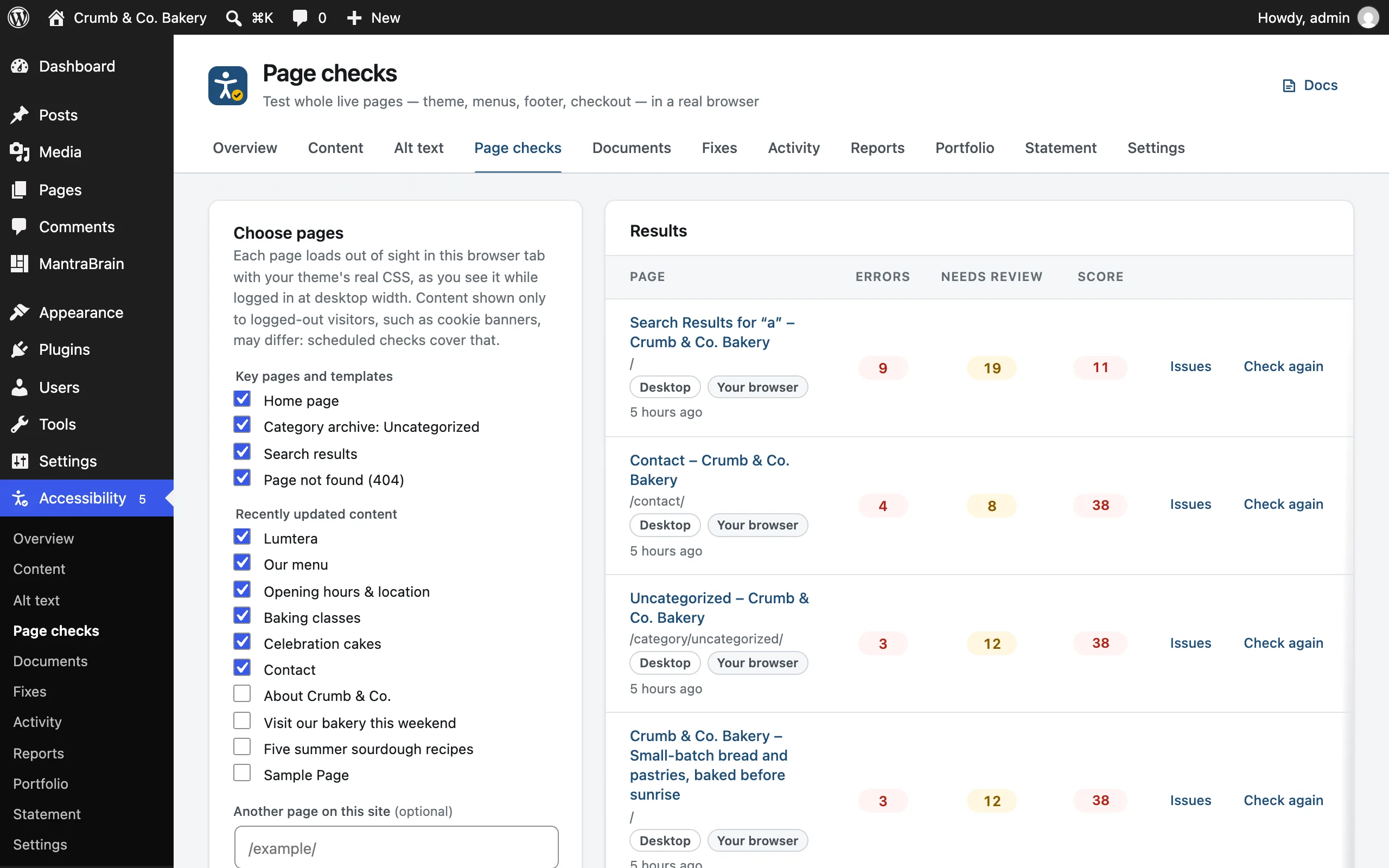
Check pages in your browser
- Under Choose pages, tick the pages to check. The first six in each list are ticked for you.
- Key pages and templates: your home page, the blog page (if you have one), WooCommerce's Shop, Cart, Checkout and My account pages, your most-used category archive, search results and the 404 page.
- Recently updated content: your 20 most recently changed published items, of the content types Lumtera checks.
- Optionally add Another page on this site, as a path such as
/about/or a full address. - To test phones too, turn on Also check at phone width (390px). Your browser remembers this choice.
- Click Check selected pages. A progress bar shows each page as it's checked.
Each page loads out of sight in your browser tab, with your theme's real CSS, as you see it while logged in. Content shown only to logged-out visitors, such as cookie banners, may differ: scheduled checks cover that.
Cart and Checkout are listed "(with a sample product)". Checking them adds a product to your own cart, so the page isn't empty.
Only pages on this site can be checked. A page that blocks being embedded, or redirects to another site, shows "The page could not be read." A page gets 20 seconds to load. Pages that fail are listed with Try again.
Phone width
With Also check at phone width on, each page is checked twice: at desktop width, then in a frame 390 pixels wide, like a common phone. The phone result is stored as its own row, labeled Phone (390px), right under the page's Desktop row.
The phone check runs every check the desktop one does, plus two that need a laid-out page: sideways scrolling and touch target size.
The frame keeps your browser's own identity. If your theme sends phones different HTML based on the browser, the phone check sees the desktop HTML at a narrow width.
What's checked
Every content check, run on the whole rendered page, plus these page checks:
| Check | WCAG | Severity | Looks for |
|---|---|---|---|
| Page has no title | 2.4.2 (A) | Error | No <title> |
| Page language is missing | 3.1.1 (A) | Error | <html lang> missing or invalid |
| No way to skip to the main content | 2.4.1 (A) | Needs review | No <main> landmark and no skip link among the first five links |
| Zooming is disabled | 1.4.4 (AA) | Error | The viewport blocks pinch-zoom (user-scalable=no or maximum-scale below 2) |
| Text has low contrast on the live page | 1.4.3 (AA) | Error | Contrast measured from the computed colors in the browser |
| Page scrolls sideways on phones | 1.4.10 (AA) | Error | Phone width only. The page scrolls sideways at 390 px. |
| Touch target is too small | 2.5.8 (AA) | Needs review | Phone width only. Links and buttons under 24 × 24 px with other targets too close. |
Live contrast reads every visible piece of text and compares its computed color with the background. It needs 4.5:1, or 3:1 for large text (24 px, or 18.66 px bold). It skips text over background images and gradients, where contrast can't be measured reliably. It reports up to 40 findings per page, and skips anything the content contrast check already reported.
Sideways scrolling. WCAG asks that content fits a 320-pixel-wide screen without scrolling in two directions, so a page that already scrolls sideways at 390 pixels fails. Lumtera names up to five elements that reach past the edge of the screen. Content that may scroll on its own is left out: tables, code, math, svg and canvas graphics, video, embedded frames, and anything inside a box that scrolls or clips its own content.
Touch targets. A link or button smaller than 24 × 24 pixels is flagged only when another target is too close to it. As WCAG allows, links inside a sentence and checkboxes or radio buttons drawn by the browser are exempt. Whether a larger control does the same job needs a person, so these findings need review. A target the content check already flagged isn't reported twice.
Findings you've hidden with site-wide ignore rules are hidden in page checks too.
Results
The results table lists each page with its Errors, Needs review count and Score. Under each page name you'll see its screen size (Desktop or Phone (390px)), who checked it (Your browser or Scheduled, logged out) and when. Pages with the most errors come first, each with its Desktop and Phone rows together.
- Issues expands the findings for that row.
- Check again re-runs the check at the same width.
- Remove takes a row out of the results. Removing a desktop row also makes scheduled checks skip that page, until you check it again in the browser. Removing a phone row doesn't affect scheduled checks.
If a page redirects, its results are stored under the page that actually loaded.
Scheduled checks
Scheduled checks fetch pages from the server as a logged-out visitor, so you see what visitors get: cookie banners, logged-out menus and so on. They're on by default, daily, once your license is active.
Settings, on the Scheduled checks card:
- Run scheduled checks: Off, Daily or Weekly. Click Save.
- Include key templates automatically (on by default). Expand N templates found to see the list.
Template discovery
With Include key templates automatically on, Lumtera finds your theme's templates for you, so archives, search and the 404 page are covered, not just pages you pick. It looks for:
- the home page, and the posts page if your front page is a static page
- your most-used category archive and tag archive
- the author archive of the author with the most posts
- search results and the 404 page
- WooCommerce's Shop, Cart, Checkout and My account pages
- the most recent published post of each post type Lumtera checks, such as a single post, page or product
Each appears in the results as Template: …, for example "Template: Category archive".
Which pages, and when
Up to 25 pages per run, in this order:
- key templates (if the option is on)
- every page you've checked in the browser
- recently updated content
Pages you removed from the results are left out.
Timing: the first run is at 03:00 (site time) the next day, then daily or weekly. Pages are checked five at a time in the background. Run now starts a run straight away and shows progress, for example "Checking as a logged-out visitor: 5 of 25 pages…". Last run and Next run show on the card.
Scheduled checks never add products to a cart, so Checkout is checked in its empty-cart state. They only request pages on your own site, and follow redirects only while they stay on it.
What scheduled checks can't do
Scheduled checks fetch pages without a browser, so they can't:
- measure color contrast. Each scheduled row says "Contrast from your browser check …" and shows the contrast findings from your last browser check, marked with the date they were measured. With no browser check yet, it says "Contrast not measured yet: run a browser check".
- lay the page out at phone width. Run a browser check with Also check at phone width for that.
- see content that is hidden only by a stylesheet.
Alerts from scheduled checks
When a scheduled check finds errors that weren't there the last time that page was checked on schedule, Lumtera Pro sends an alert to the email addresses and Slack webhook set under Monitoring & alerts. The alert says "Found by the scheduled check of …, loaded as a logged-out visitor." and links to Open page checks. The first scheduled check of a page only records the starting point.
Page checks in reports
Client reports include a Live page checks section for public pages, using each page's desktop result. Page check results also feed the report's WCAG checklist and the conformance report.
For developers
lumtera_pro_scheduled_templatesfilters the templates found automatically.lumtera_pro_scheduled_urlsfilters the final list of URLs to check. The list is still capped at 25.lumtera_pro_send_page_alertcan stop an alert for a page.
See Hooks & filters.