
Classic editor & page builders
Lumtera checks what your content really outputs. Blocks are rendered the same way they are on the front end, and shortcodes are expanded. Page builders are checked from their own output, and custom fields are checked with the post.
Classic editor
In the classic editor, an Accessibility check box appears below the content.
- It lists the issues from the last save. Save your changes, then click Check saved version to check again.
- Each issue has a Dismiss button, which asks for an optional reason.
- Where a fix mentions block settings: in the classic editor, click an image and choose the pencil (Edit) to set its alternative text, or edit the markup in the Text tab.
The classic editor doesn't check live, show a reading level or hold publishing. Guided manual checks are only in the block editor.
Elementor
Elementor pages are checked from Elementor's own output, not from the post content, so the results match what visitors see. They're checked again each time you save in Elementor.
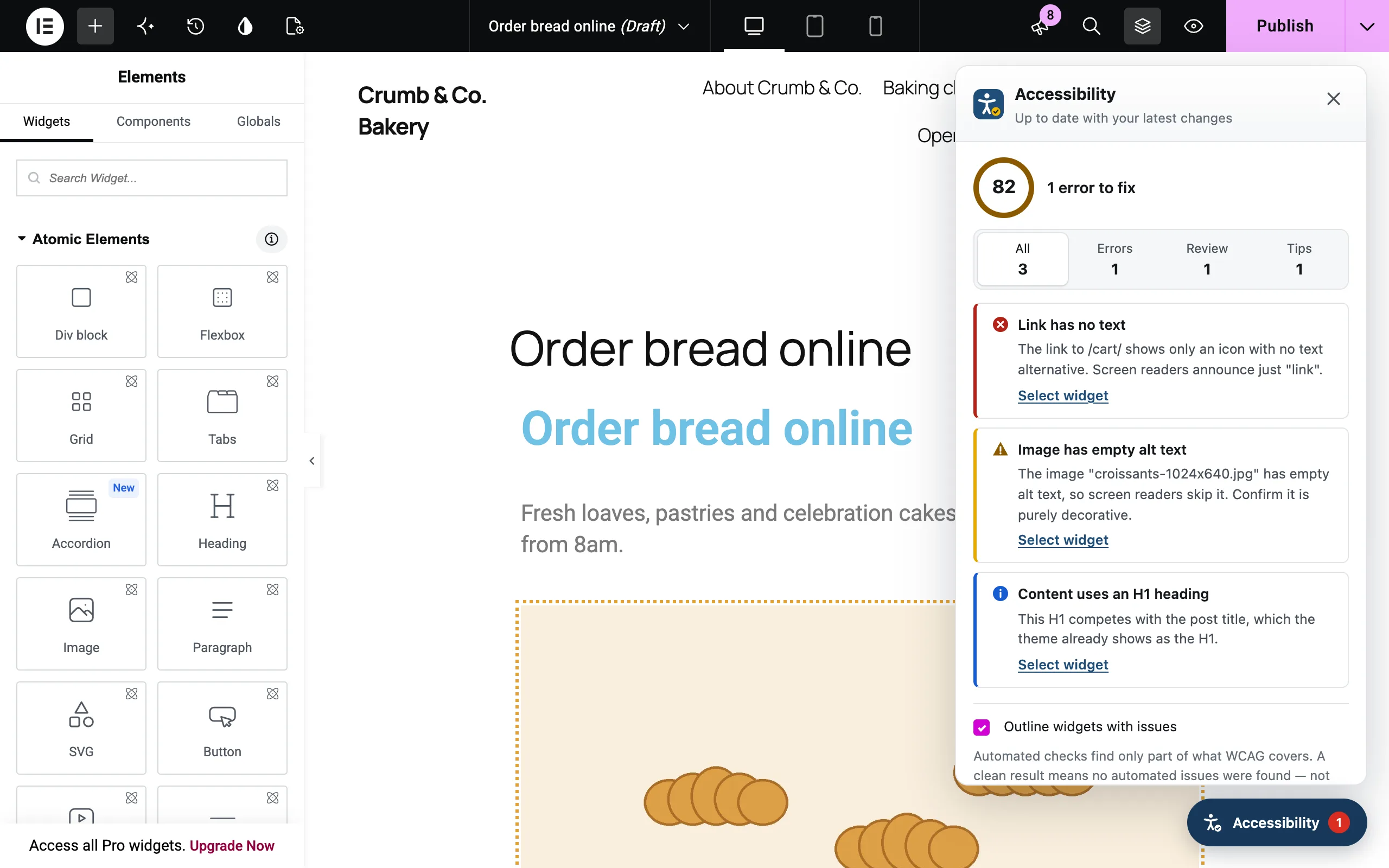
Inside the Elementor editor, an Accessibility button floats at the bottom of the preview, with a red badge if there are errors. It opens a panel with:
- the score, headline, reading level and filters (All, Errors, Review, Tips)
- an issue card for each problem, with Select widget, How to fix, the markup and a WCAG link
- Dismiss (without a reason field), and a list of dismissed items with Restore
- Outline widgets with issues, which is remembered in your browser
The panel checks your unsaved changes too, a moment after each edit. Anywhere else in Lumtera, links to an Elementor page open it in Elementor.
If you open an Elementor page in the block editor, the Lumtera sidebar shows results for its saved layout, with an Edit with Elementor button.
The panel appears for the content types Lumtera checks, for people who can edit the page. Elementor's own Role Manager still applies.
Other page builders
Lumtera also checks layouts built with these builders. Each one turns on by itself when the builder is active. There's nothing to set up.
| Builder | What's checked | "Edit" links open |
|---|---|---|
| Divi 4 | The layout, rendered by Divi | The Visual Builder |
| Divi 5 | Divi 5 layouts are blocks, so they're checked like any block content | The Visual Builder |
| Beaver Builder | The published layout, rendered by Beaver Builder | Beaver Builder |
| Bricks | The post's content area, rendered by Bricks | The Bricks builder |
| Oxygen 2 to 4 (classic Oxygen) | The layout, rendered by Oxygen | The Oxygen builder |
| WPBakery | The layout, rendered by WPBakery | WPBakery's front-end editor if it's switched on, otherwise the normal edit screen |
Unlike Elementor, these builders don't get a Lumtera panel inside the builder. Their results appear in the site report, the Accessibility column and review mode. Links to the post from Lumtera's screens open it in the builder.
Good to know:
- Only the post's own content is checked. Headers, footers and templates made in the builder, such as Beaver Themer layouts or Bricks templates, aren't part of the post. Use the Whole page tab in review mode to check them.
- Beaver Builder: unpublished drafts of a layout aren't checked, only the published layout.
- Bricks: dynamic data that depends on the page being viewed, such as query loops, may come out differently from what visitors see.
- Divi 4: if Divi's modules can't be loaded while Lumtera checks, only the text inside the modules is checked. Settings stored in the modules, such as image alt text and button text, are then missed.
- Results update when the post is checked. If a result looks out of date after you edit in a builder, click Check again on the item in the Content report.
Not supported yet
Oxygen 6 and Breakdance aren't supported yet. Posts built with them get Lumtera's normal check of the post content, which usually finds nothing, because their layouts are stored elsewhere. Use review mode to check these pages as they're rendered.
Advanced Custom Fields
If you use Advanced Custom Fields (free or Pro), the values saved in a post's fields are checked along with its content. These field types are checked:
- Text, Text area and WYSIWYG editor (rich text)
- Link, using the link's title as its text, or the web address if it has no title
- Image and Gallery, using each image's alt text from the Media Library
- oEmbed, when the embed has already been fetched and cached
- Repeater, Group and Flexible content fields, and the fields inside them, up to five levels deep
Not checked: plain URL fields, choice, number, date and relationship fields, clone fields, and fields on options pages, terms or users.
Keep in mind:
- Saved values are used. A live check in the editor uses your unsaved post content with the field values from the last save.
- Field content is added after the post content. Your theme decides where each field really appears, so findings that depend on order, such as skipped heading levels, may differ from the real page.
- Findings don't name the field yet. They show the markup that caused them, which you can use to find the field.
WooCommerce
When WooCommerce is active, products are checked by default. Lumtera checks both the product description and the short description. Products appear in the reports and get the Accessibility column in the products list.
Page checks in Lumtera Pro can also check the Shop, Cart, Checkout and My account pages, with your theme.
Block libraries
Lumtera renders third-party blocks exactly as they appear on the front end, then traces each issue back to its block. It's been tested with the blocks of Spectra, Kadence Blocks, GenerateBlocks, Stackable, Otter and Essential Blocks.
Reusable blocks (synced patterns), template parts and navigation are checked as part of the output, but Select block takes you to the containing block, not inside it.
Shortcodes
Shortcodes in your content are expanded before checking, so a contact form added with a shortcode is checked too.
Other content types
Any public content type can be checked, including custom post types. Choose them under Settings → Content to check.
What isn't checked here
Content checks don't see your theme's header, menus, sidebar or footer. To check those, use the Whole page tab in review mode, or page checks in Pro.